A Guide to Legal Document Automation Software
Discover how legal document automation software transforms legal workflows. This guide covers features, real-world uses, and AI's role for modern legal teams.
At its heart, legal document automation software is a tool that turns your standard, static document templates into smart, adaptable systems. Instead of the old-school copy-and-paste routine for every new client or case, this software uses data and a set of rules you define to automatically create perfectly customized contracts, NDAs, or other legal paperwork in a fraction of the time.
This frees up legal professionals to focus on the work that actually requires their expertise.
From Manual Drudgery to Automated Precision

For centuries, much of legal work felt like a scribe's job—painstakingly copying out manuscripts by hand. Every contract, filing, and letter demanded intense manual effort, a process that was not only slow but also ripe for human error. Many legal teams today are still stuck in a modern version of that reality, buried under a mountain of repetitive admin work.
Countless hours of high-value expertise are wasted just finding the right template, swapping out names and dates, and triple-checking that every clause is correct. This manual grind doesn't just kill productivity; it introduces serious risk. A single wrong number or an outdated clause can spiral into a major compliance headache or financial liability.
The Shift to Intelligent Systems
This is exactly the problem that legal document automation software solves. Think of it as the leap from a scribe to a printing press. You're no longer crafting one document at a time. Instead, you build a "master plate"—an intelligent template loaded with conditional logic.
This system then pulls in specific client data and uses simple "if/then" rules to generate perfectly tailored documents whenever you need them.
The market for this technology is booming, projected to hit USD 1913.16 million by 2035. Why? Because it delivers real results. For standard agreements, these platforms can slash document prep time by up to 70% and improve accuracy by more than 45%, dramatically cutting the risks tied to manual mistakes.
This technology fundamentally changes the role of legal professionals. It shifts their focus from being document assemblers to strategic advisors, allowing them to apply their expertise where it truly matters.
Why Automation Is No Longer Optional
In an environment where budgets are tight and workloads are growing, you can't afford to be inefficient. A huge driver for adopting this technology is the clear need for using automation to reduce repetitive staff tasks in legal orgs. By automating the routine stuff, legal teams can achieve so much more.
- Accelerate Turnaround Times: Get contracts and agreements out the door in minutes, not days.
- Ensure Consistency: Lock in compliance by making sure every document aligns with the latest company policies and legal standards.
- Reduce Operational Costs: Cut down on billable hours spent on low-value administrative work.
- Empower Legal Teams: Free up your professionals to focus on negotiation, client relationships, and complex legal strategy.
This guide will walk you through everything you need to know about this powerful technology, from its core features to making a smart investment for your team.
Understanding the Core Features and Benefits
To really get what legal document automation software does, you have to look under the hood. This isn't just about filling in templates; it's a smart system built to give legal experts their time back. The core features all work together to build a more efficient, accurate, and compliant practice.
At its heart is dynamic templating. Picture a single, master Non-Disclosure Agreement. Instead of manually creating slightly different versions for various states, parties, or terms, a dynamic template does the heavy lifting for you. It automatically pulls in the right data and uses pre-set rules to generate the perfect version on the spot.
That means one core document can instantly create hundreds of unique, compliant variations without a single copy-and-paste error.
Building Intelligence with Conditional Logic
The real magic, though, is conditional logic. This is basically a set of "if/then" rules you build directly into your templates. Think of it as the brain of the operation, making smart decisions based on the information it's given.
For instance, a rule might be: "IF the contract value is over $100,000, THEN insert the clause that requires board-level approval." This simple command completely removes the risk of a paralegal forgetting to add a critical clause. It makes your documents not just faster to create, but fundamentally smarter and safer.
These kinds of automated checks and balances are what ensure consistency and enforce your firm's policies across every single document that goes out the door.
A huge benefit here is the massive reduction in human error. When you hand off rule-based decisions to the software, you're creating a powerful safety net that protects against compliance slip-ups and minimizes risk with every document.
Industry adoption is clearly moving from cautious curiosity to full-on implementation. We're seeing this software become a standard part of modern legal operations. By 2026, it's expected that 28% of law firms and 23% of corporate legal departments will be actively using these tools. This trend shows just how vital features like data extraction and playbook automation have become for standardizing everything from simple engagement letters to complex court exhibits. For a deep dive into the numbers, you can read the full research about document automation software adoption.
Seamless Data Integration and Collaboration
Another critical feature is seamless data integration. This software doesn't operate in a vacuum. It's designed to connect directly to the other systems you rely on every day, like your Client Relationship Management (CRM) or practice management software. When you kick off a new document, the system can automatically pull in client names, addresses, and case numbers.
This gets rid of tedious, redundant data entry and prevents the kind of small typos that can create big legal problems. The ability to sync information across platforms is foundational to building a workflow that’s truly connected and efficient. Of course, once the document is created, you often need to analyze the information within it. For more on that, check out our guide on how to extract information from PDF files.
Finally, secure cloud collaboration is what makes it all work for today's distributed legal teams. It allows everyone to securely access, edit, and approve documents from anywhere.
- Centralized Version Control: No more confusion over which draft is the "final_final_v2" version. Everyone works from the same up-to-date document.
- Audit Trails: The software logs every single change, comment, and approval, giving you a clear, defensible record of the document’s entire history.
- Granular Permissions: You get to control exactly who can see, edit, or approve certain documents, which is essential for protecting sensitive client information.
These features come together to create a system that doesn't just churn out documents faster—it makes them more accurate, more compliant, and far more secure.
To really see the difference, let’s compare a typical manual process with one that’s been automated.
Manual vs Automated Document Workflow Comparison
The table below breaks down the key differences in time, cost, and accuracy when you compare traditional workflows to those powered by legal document automation. It's a stark contrast that highlights where the real value lies.
| Process Step | Manual Workflow (Traditional) | Automated Workflow (with Software) |
|---|---|---|
| Initial Drafting | Attorney/Paralegal drafts from scratch or a static template. (2-4 hours) | Software generates a first draft in minutes using a dynamic template and questionnaire. (5-10 minutes) |
| Data Entry | Manually inputting client details, dates, and specific terms. High risk of typos. (30-60 minutes) | Data is pulled automatically from CRM or other systems. Zero data entry errors. (1-2 minutes) |
| Internal Review | Manual review for errors, missing clauses, and policy compliance. Often involves multiple emails. (1-3 hours) | Automated checks for compliance based on pre-set rules. Review focuses on strategy, not boilerplate. (15-30 minutes) |
| Version Control | Managing multiple drafts via email attachments (e.g., "Contract_v3_final.docx"). Prone to confusion. | A single, centralized document with a full audit trail. No version confusion. |
| Finalization & Signing | Printing, scanning, and physically signing documents. | Integrated e-signature workflows trigger automatically upon final approval. |
| Overall Risk | High risk of human error, inconsistent language, and compliance oversights. | Minimal risk. Rules-based logic ensures consistency and compliance. |
As you can see, the time savings are immediate and substantial, but the real win is in the reduction of risk and the enforcement of quality control. Automation transforms a high-touch, error-prone process into a predictable, reliable, and secure operation.
Seeing Automation in Action: Real-World Scenarios
It’s one thing to talk about features, but it’s another to see how legal document automation software actually works on the ground. This isn't just theory; it’s about solving real, everyday headaches that bog down legal professionals.
Let's walk through a few common situations where automation completely changes the game, turning tedious, high-risk tasks into streamlined, predictable workflows.
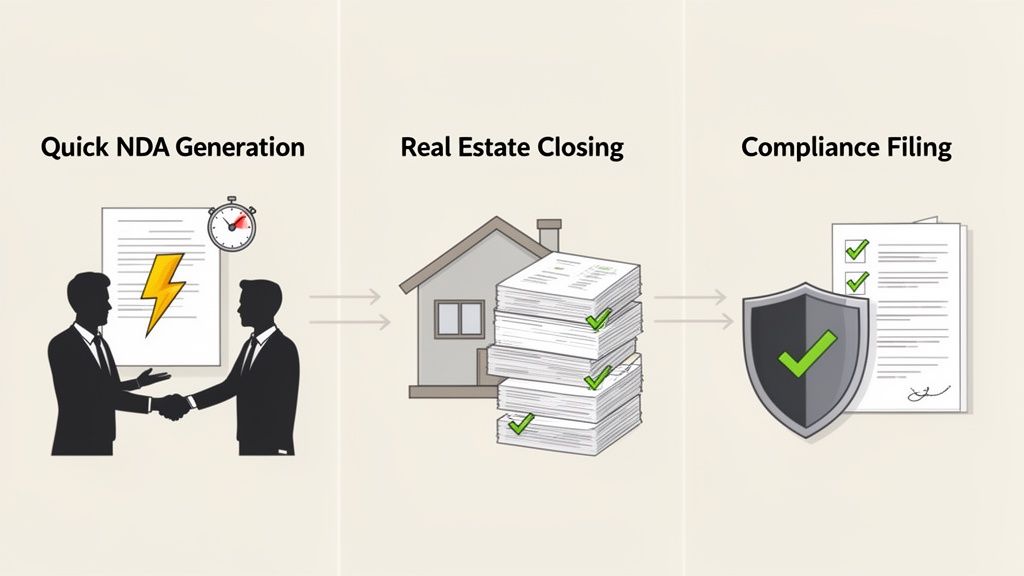
Use Case 1: The In-House Team Buried in NDAs
The Problem: Picture a rapidly growing tech company. Their small in-house legal team is getting swamped with requests for Non-Disclosure Agreements (NDAs). Every new sales prospect, partnership talk, or contractor needs one. Each NDA has to be tweaked for different jurisdictions, confidentiality terms, and party details, creating a massive bottleneck that stalls business.
The Solution: The team brings in a document automation platform. They design one master NDA template that’s connected to a simple intake form. Now, the sales and business development teams can generate their own NDAs by just filling out a few fields. The software does the rest, instantly producing a perfectly tailored, compliant agreement.
The Outcome: The turnaround time for a standard NDA plummets from days to less than five minutes. The legal team is no longer a roadblock. They can finally focus their expertise on high-stakes contract negotiations, and the entire deal cycle speeds up.
Use Case 2: The Real Estate Firm Juggling Closing Packages
The Problem: A busy real estate law firm is struggling to assemble closing packages. Each closing involves dozens of documents, and a single typo in a name, address, or dollar amount can derail the whole transaction. Manually checking for consistency across every single form is not just time-consuming—it's a recipe for costly mistakes and a damaged reputation.
The Solution: The firm sets up a "closing package" workflow in its automation software. By entering the core transaction details just once, the system automatically populates everything—the purchase agreement, the deed, the mortgage forms—with 100% accuracy.
This creates a single source of truth for all client and property data. It completely removes the risk of contradictory information sneaking into different documents and turns a stressful, detail-heavy process into something reliable and repeatable.
The Outcome: The firm cuts the time spent preparing closing packages by over 80% and virtually eliminates errors. This allows them to handle more closings without hiring more staff, boosting both profits and client happiness. This kind of technology also paves the way for modern practices like digital signatures. If you're curious about how this applies to notarizations, check out a complete guide to Remote Online Notarization for your business.
Use Case 3: The Financial Firm Navigating Compliance Filings
The Problem: A financial services company is under constant pressure to keep up with ever-changing regulations. Every quarter, the compliance team spends weeks manually updating disclosure documents and regulatory filings. It's a high-stakes grind where one missed update or clerical error could lead to massive fines.
The Solution: The company invests in a platform with powerful conditional logic. The compliance team builds dynamic templates that automatically adjust themselves. Based on the jurisdiction, product, or latest regulatory changes, the templates add or remove the necessary clauses on their own.
The Outcome: The whole process becomes centralized and standardized. Instead of taking weeks, the team can now generate fully compliant filings in a few hours. Better yet, the system provides a clear audit trail, proving they've followed all the rules. It’s a massive time-saver that also dramatically lowers the company’s risk profile.
How to Choose and Implement the Right Software
Picking legal document automation software isn't just an IT decision—it’s a fundamental shift in how your team works. The right tool can be a game-changer, freeing up your team for high-value work. But the wrong one? It becomes an expensive, frustrating roadblock that nobody wants to use.
Getting this right comes down to two things: a smart selection process and a well-planned rollout.
Key Evaluation Criteria for Your Software
Before you jump into demos and sales pitches, you need to know exactly what you’re looking for. Your team's size, the complexity of your documents, and your current tech setup will all point you toward the right solution.
Here are the absolute must-haves to put on your checklist:
- Ease of Use and Template Building: If your lawyers and paralegals need a computer science degree to build a template, you’ve already lost. Look for intuitive, no-code or low-code platforms where your team can create and tweak templates themselves. A clunky interface is the fastest way to kill adoption.
- Integration Capabilities: This is huge. Your new software has to play nicely with the tools you already rely on every day—your document management system, CRM, and e-signature platforms. If it doesn't, you're not automating; you're just creating new, disconnected data silos and more manual work.
- Security and Compliance: When you’re handling sensitive client data, security isn't just a feature; it's the foundation. Make sure any platform you consider has end-to-end encryption, detailed access controls, and a complete audit trail. It absolutely must be compliant with standards like SOC 2 or GDPR. No exceptions.
- Scalability: Think about where your firm or legal department will be in two or three years. The right tool should grow with you, easily handling more documents, more complex workflows, and more users as your needs evolve.
Your Step-by-Step Implementation Playbook
Once you’ve made your choice, how you introduce the software is just as important as what you chose. Rushing the implementation is a classic mistake that can sink the entire project before it even starts.
Follow this playbook for a smooth and successful launch.
Define Clear Objectives and Scope: Don't try to boil the ocean. Start with a small, manageable win. Pick one or two high-volume, mind-numbingly repetitive documents—like NDAs or standard engagement letters—to automate first. A quick victory here builds confidence and shows everyone what's possible.
Run a Pilot Program: Grab a small group of tech-savvy (or at least enthusiastic) team members and let them test-drive the software. This pilot phase is your secret weapon. It helps you iron out unexpected kinks, gather honest feedback, and create internal champions who can advocate for the tool when you roll it out to everyone else.
Secure Stakeholder Buy-In: Get everyone who will touch this system—legal, IT, and other business units—in the same room from the very beginning. Explain the "why" behind the change. Frame it in terms they care about, like faster deal cycles for sales or reduced risk for compliance.
A successful implementation is less about the technology and more about the people. If users don't understand the benefits or feel the tool makes their job harder, they simply won't use it.
Develop a Comprehensive Training Program: Training shouldn't be a one-off webinar. It needs to be practical and tailored to how your team actually works. Show them how this new tool solves their specific daily headaches. Back it up with ongoing support and easy-to-find resources. As you create more automated documents, you'll also need a solid system to manage them; for a deeper dive, check out our guide on document management best practices.
Monitor and Measure Success: Once you're live, you need to track your progress. Keep an eye on key metrics like document creation time, error rates, and how many people are actively using the software. This data is pure gold—it proves the ROI, helps you fine-tune your workflows, and points you to your next big automation opportunity.
The Future of Legal Work: What Happens When AI Gets Involved?
If traditional automation is like following a detailed recipe, then adding Artificial Intelligence (AI) is like giving that recipe to a master chef. The chef doesn't just follow the steps; they understand the ingredients, improvise, and create something far more sophisticated. That's what's happening with legal document automation software. It’s evolving from a simple template-filler into a thinking partner for legal professionals.
AI is changing the game entirely, pushing legal work to be more predictive and strategic.
Think about it. AI-powered systems can now rip through a third-party contract in seconds, not hours. They instantly check an incoming agreement against your firm’s playbook, flagging risky clauses or pointing out what’s missing—things a tired human eye might easily miss after a long day. The best tools will even suggest better phrasing that fits your company's risk profile.
From Just Generating to Actually Understanding
This is a huge leap. Standard automation is fantastic at churning out documents based on data you feed it. But AI is different; it's built to understand and interpret documents it has never seen before. When you put these two capabilities together, you get a seriously powerful workflow.
Imagine you've just used your software to automatically generate a complex merger agreement. Great. Now what? The next step is to analyze and interact with it. This is where you see the real magic happen when you pair automation with other AI tools, like a PDF summarizer.
Choosing the right platform is the critical first step, of course. The process isn't just about picking the one with the most features.
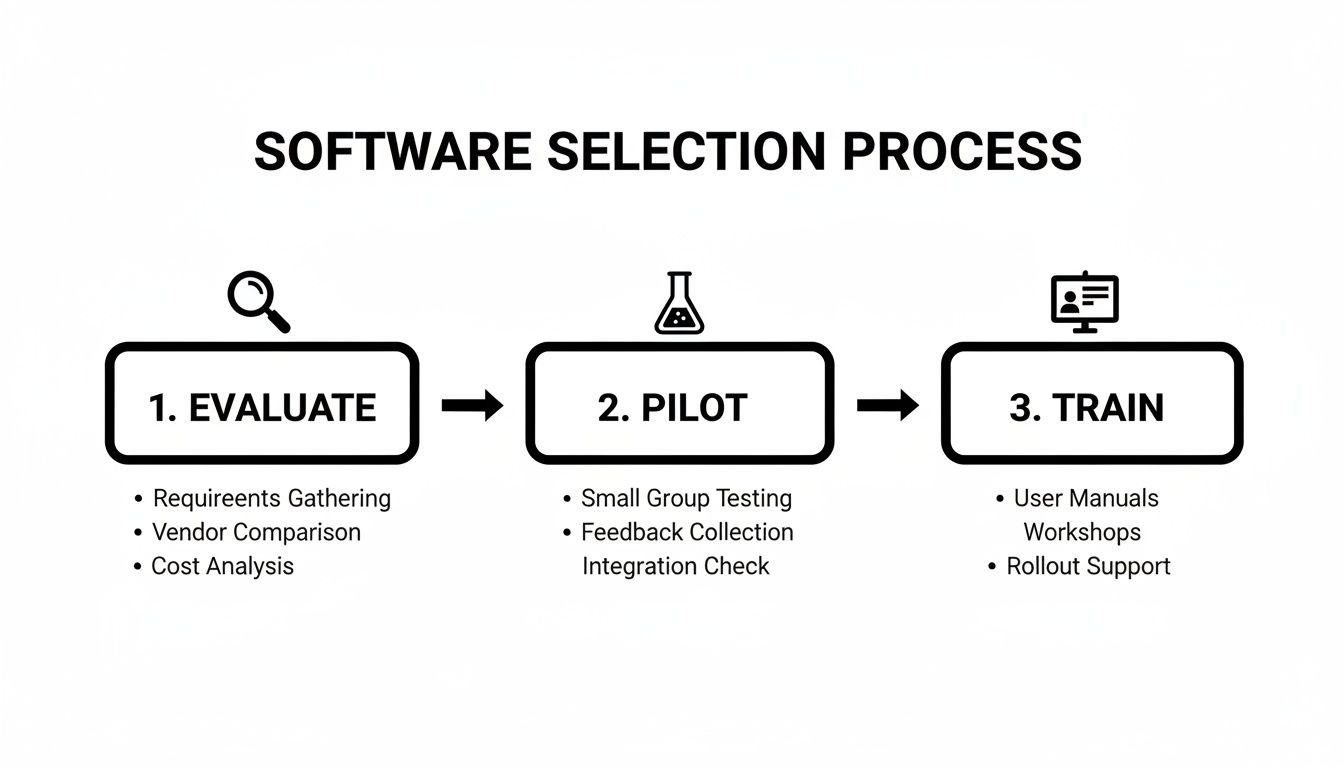
As this flowchart shows, a smart selection process involves careful evaluation, real-world pilot testing, and proper training to make sure the team actually uses it.
The market is exploding for a reason. Projections show the AI in Legal Document Automation market is set to grow by a massive USD 2.25 billion between 2024 and 2029, with a compound annual growth rate of nearly 31%. Why? Because firms are desperate for efficiency, and early adopters are already reporting they’ve cut time spent on routine tasks by 30%. You can dig into these powerful market growth findings on Technavio.com.
Creating an Intelligent Document Ecosystem
This blend of document creation and AI-powered analysis is what modern legal work looks like. Once a document is created, you can use an intelligent tool to "talk" to it, turning a static file into a dynamic resource.
Here’s how this actually works in practice:
- Instant Verification: You've just generated a 100-page contract. Instead of scrolling, you ask the AI, "What is the liability cap?" You get an immediate answer with a direct link to the clause.
- Cross-Document Q&A: You can upload your newly generated contract and a master service agreement and simply ask, "Are there any conflicting terms between these two documents?"
- Effortless Summarization: Need to get the business team up to speed? Create a quick, high-level summary of a freshly drafted agreement in seconds. For more on this, check out our guide on how to use AI to summarize a PDF.
- On-the-Fly Translation: Instantly translate key sections of a contract for your international partners, helping to smooth out negotiations and avoid misunderstandings.
This combination of automated generation and intelligent comprehension isn’t some far-off concept; it’s quickly becoming the new standard for high-performing legal teams. It transforms static documents into interactive knowledge bases, allowing legal pros to work faster and with more confidence than ever before.
This powerful duo means legal teams are no longer just producing documents more efficiently. They're now able to pull real value out of them, spot risks faster, and uncover insights with incredible speed—a true evolution in how the law is practiced.
Frequently Asked Questions
Stepping into the world of legal document automation can bring up a lot of questions. It's a big shift in how legal work gets done, so it's completely natural to want to understand the details. Let's tackle some of the most common things people ask so you can get a clearer picture of how this technology works in the real world.
We'll cover the big concerns: data security, how the software fits in with your existing team, how it connects with the tools you already use, and what kind of return you can actually expect.
Is Legal Document Automation Software Secure for Confidential Information?
Absolutely. For these platforms, security isn't just a feature—it's the foundation. The leading tools are built with bank-grade security because they know they're handling your firm's and clients' most sensitive information.
They use end-to-end data encryption, which is a fancy way of saying your data is scrambled and unreadable both when it's being sent over the internet and when it’s sitting on a server. On top of that, these systems have granular access controls. This lets you decide exactly who on your team can create, view, edit, or approve certain documents, making sure confidential information is only seen by the people who are supposed to see it.
The best providers also comply with tough international security standards, like:
- SOC 2 (Service Organization Control 2): This is a third-party audit that verifies a provider is handling your data securely to protect your organization and your clients' privacy.
- GDPR (General Data Protection Regulation): If you handle data from anyone in the European Union, this is a non-negotiable. It ensures the provider follows strict rules for data privacy.
When you're looking at different options, don't be shy about asking for their security certifications. It’s the best way to get independent proof that they take security as seriously as you do.
Will This Software Replace Lawyers or Paralegals?
Not at all. The goal is to make legal professionals better, not to replace them. Think of it as a powerful assistant for your team, one that's designed to take on the repetitive work that doesn't actually require legal expertise.
This technology is all about automating the tedious, low-value tasks that eat up so much of a legal professional's day—things like manually copying and pasting client data, proofreading for basic consistency, or formatting a document to match specific style guides.
The real win with automation is that it frees up your skilled lawyers and paralegals to focus on the work that truly matters. We're talking about strategic thinking, complex legal analysis, client negotiations, and exercising professional judgment. It’s about elevating their roles, not eliminating them.
By taking over the administrative heavy lifting, the software lets your legal team work at the top of their game. They can deliver better, faster, and more strategic advice to clients, which is what really drives value for your firm or company.
How Difficult Is It to Integrate with Our Existing Systems?
Modern tools are built to connect. The days of clunky, standalone software that won't play nicely with anything else are pretty much behind us. Most platforms know they have to fit into your existing tech setup to be truly useful.
Top-tier document automation software usually comes with pre-built integrations for the tools legal teams use every day. This often includes:
- CRMs like Salesforce
- Document Management Systems such as SharePoint
- E-signature Platforms including DocuSign
These "out-of-the-box" connections create a smooth flow of information across all your systems, so you're not stuck entering the same data over and over. For more custom needs, many providers also offer an API (Application Programming Interface). An API is basically a bridge that lets your IT team or a consultant build custom connections to your firm’s unique, in-house systems.
Before you commit to a platform, make a list of your must-have integrations and walk through it with each vendor. Making sure the software will slide right into your current workflow is a crucial step for a successful rollout.
What Is the Typical Return on Investment?
The return on investment (ROI) you get from legal document automation is huge, and it goes way beyond just saving a few dollars.
The most obvious return is the massive amount of time you get back. It's not uncommon for firms and in-house teams to report cutting down document drafting time by over 70% for their routine work. That efficiency boost means lower operational costs and frees up your team to handle more work without needing to hire more people.
But there’s also a powerful "risk reduction" ROI. By using standardized templates and rules-based logic, automation slashes the risk of human error. We all know a single mistake in a contract—a wrong number or a missing clause—can lead to compliance failures, messy legal disputes, or serious financial penalties. Minimizing that risk has incredible value, even if it’s a bit harder to put a number on.
Finally, the ROI also shows up in happier clients and internal stakeholders. When you can turn around contracts and agreements faster, business deals close sooner and everyone is more satisfied. Delivering consistent, high-quality documents also polishes your brand’s reputation. Most organizations find that the combination of efficiency, risk mitigation, and better service makes the investment a no-brainer.
Ready to stop wasting time on manual document work and start getting instant insights? PDF Summarizer allows you to chat with your legal documents, verify key terms in seconds, and even ask questions across multiple files at once. Try PDF Summarizer for free today and transform your document review process.
Relevant articles

Discover the 12 best document collaboration tools for any team. Compare features, pricing, and use cases to find the perfect platform for your workflow.
Discover how intelligent document processing software uses AI to automate data extraction, boost accuracy, and streamline workflows.

Learn how to upload a PDF on any device with our practical guide. Discover pro tips for file size, naming conventions, and fixing common upload errors.
Discover how a modern PDF document search engine uses AI and semantic search to unlock information across all your files. Find anything in seconds.

Learn how to combine multiple PDFs into one free. This guide covers the best tools and methods for Mac, Windows, mobile, and online PDF merging.
Discover how to combine pdf files on any device with quick, practical steps for students and pros to merge docs effortlessly.