What Is Question Answering AI and How Does It Work?
Discover how question answering AI transforms documents into conversations. Learn how NLP and machine learning deliver instant, sourced answers from your files.
Ever found yourself staring at a monstrous, 100-page report, knowing the one statistic you need is buried somewhere inside? We've all been there, flipping through pages, eyes glazing over. Now, imagine just asking the document a direct question and getting the answer instantly. That's the magic of question answering AI.
From Page-Flipping to Instant Answers
This technology is changing how we interact with information. It takes static files—dense research papers, lengthy legal contracts, you name it—and turns them into interactive conversations. This isn't some far-off concept; it's a real tool that professionals, students, and researchers are using right now to get back hours of their day.
The idea is straightforward: let the machine do the heavy lifting. A question answering AI reads and actually understands the content for you. You can then ask it questions in plain English, just like you would a colleague. This goes way beyond a simple Ctrl+F keyword search, which just looks for exact word matches. A smart AI gets the meaning behind what you're asking.
Unlocking Deeper Understanding
For instance, you could ask a financial report, "What were the main reasons revenue went up last quarter?" instead of just searching for the phrase "revenue growth." The AI will piece together information from different charts, tables, and paragraphs to give you a complete, coherent answer.
This conversational approach brings some serious benefits to the table:
- Speed and Efficiency: Why spend hours searching when you can get an answer in seconds? The demand for this kind of speed is exploding—AI referrals to websites shot up by an incredible 357% in just one year.
- Better Comprehension: Asking questions and getting answers makes you engage with the material. It’s a much more active way to learn and helps the information stick.
- Trustworthy Accuracy: The best tools don't just give you an answer; they show you their work. They provide clickable citations that take you right to the source in the original document, so you can verify everything for yourself.
This shift means that simply ranking high in a search isn't enough anymore. In the world of AI search, what matters is having the specific piece of content that gets chosen for the final answer.
At the end of the day, this technology makes complex information more approachable for everyone. Tools like PDF Summarizer put this power directly into your hands. By letting you chat with a single PDF or even ask questions across multiple documents at once, they transform your cluttered files into a dynamic library of knowledge, ready to answer your questions.
How AI Learns to Understand Your Questions
Ever wonder how a machine can read a question like, "What were the key findings of this study?" and actually understand it? It’s not magic. The secret sauce is a field of AI called Natural Language Processing (NLP).
Think of NLP as the AI's personal linguist. It doesn't just scan for keywords; it's trained to pick up on the intent, context, and all the subtle meanings packed into the way we write and speak.
The whole process starts by breaking your question down into its smallest parts. The AI first chops up a sentence into individual words and punctuation marks—a step called tokenization. From there, each of these "tokens" gets turned into a special numerical code (a vector) that represents its meaning. This is how the AI knows that "king" and "queen" are related, while "king" and "bicycle" are worlds apart.
From Words to Meaning
Once the AI gets a handle on the individual words, it uses powerful models to figure out how they all fit together. Modern question answering AI often relies on something called a Transformer model, which is brilliant at figuring out which words in your question matter most.
For example, if you ask, "What was the company's net profit in Q4?", the AI instantly recognizes that "net profit" and "Q4" are the heavy hitters, while "what was the" is just grammatical glue.
This kind of smart analysis is exactly what's powering the incredible growth in conversational AI. The global AI market, valued at USD 390.91 billion in 2025, is expected to explode to USD 3,497.26 billion by 2033. That’s a massive 30.6% CAGR, all driven by NLP getting good enough for us to just ask questions and get instant, sourced answers from our documents.
Visualizing the AI Workflow
This simple flowchart shows just how much this changes the game for document analysis. What used to be a long, manual slog is now a quick back-and-forth.
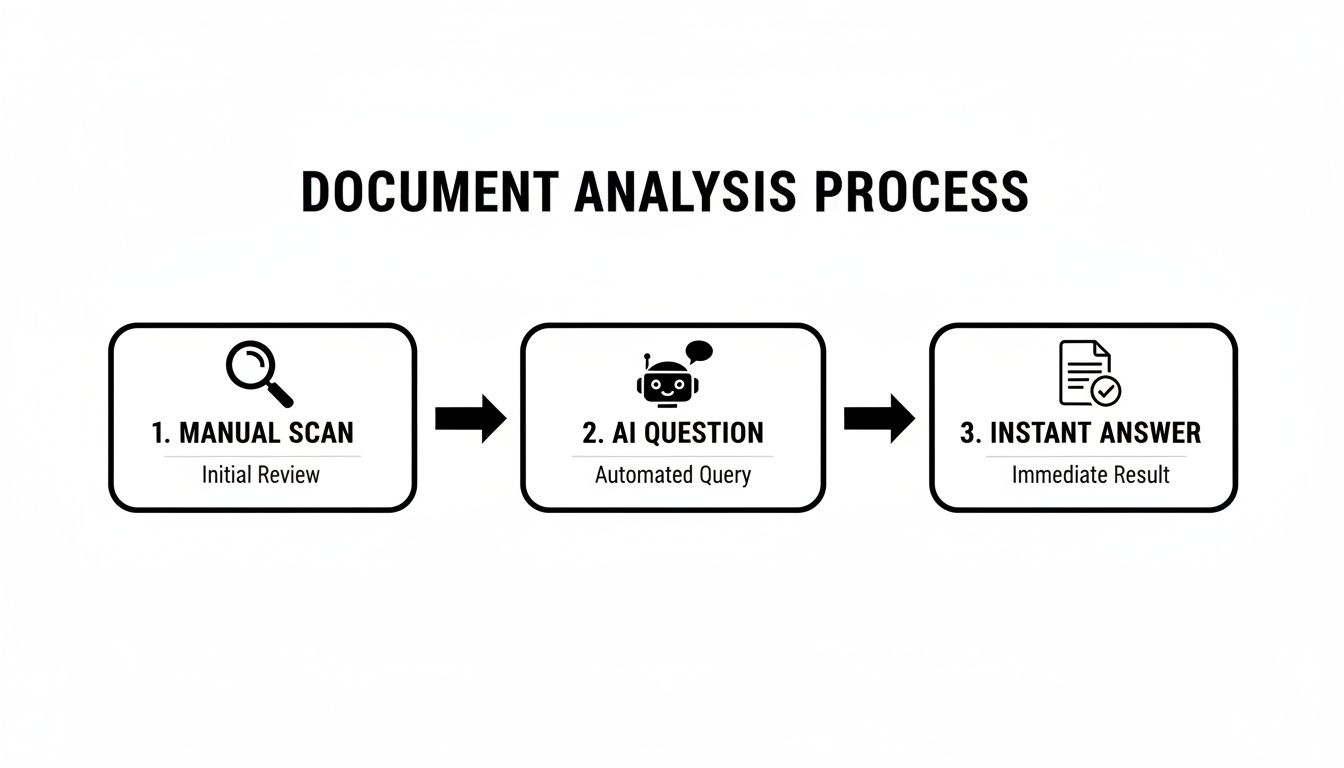
You can see the clear jump from painstakingly scanning pages to just having a conversation with your files. Direct questions get you direct answers, pulled right from the source.
The real breakthrough isn't just that the AI can read. It's that it can understand the relationships between different ideas in the text. This lets it connect the dots and give you an answer that might be pieced together from several different sentences.
In the end, this whole process allows the AI to create a detailed mental map of your entire document. When you fire off a question, it uses that map to pinpoint the exact right spot and give you a helpful, accurate answer.
To really dig into the mechanics, you can check out this fantastic a guide to AI question answering. This same core ability to understand text is also what makes a good PDF summary generator work—it has to comprehend the content before it can ever hope to summarize it.
Putting Question Answering AI to Work
The theory behind this technology is fascinating, but where it really comes alive is in the real world. The core value of question answering AI isn't just about finding things faster; it's about completely changing how we engage with and understand complex documents.
Think of a grad student buried under a mountain of research papers for their thesis. Instead of dedicating weeks to manually sifting through PDFs, they can now upload their entire library and ask a specific, targeted question. The AI pulls together answers from dozens of different sources, complete with citations, compressing a month of grueling work into a single afternoon.
This same power is being applied across countless industries, saving an incredible amount of time and cutting down on human error.
How Professionals Are Using It Every Day
The applications are as diverse as the people using them. Here are a few common examples that show just how indispensable this technology is becoming:
- Legal Teams: A paralegal can instantly find a specific clause across hundreds of contracts by simply asking, "Show me all non-compete agreements with a duration longer than one year." This completely eliminates days of tedious manual review.
- Financial Analysts: Instead of reading every dense quarterly report from cover to cover, an analyst can pull key performance indicators by asking for "YoY revenue growth" or "operating margin."
- Medical Researchers: A scientist can compare findings from multiple clinical trial studies simultaneously, spotting patterns or contradictions that would be almost impossible to catch by hand.
This surge in adoption is powered by the explosive growth of conversational AI—the engine running these systems. The market size, valued at USD 12.82 billion in 2024, is expected to skyrocket to USD 136.41 billion by 2035. You can dig into the numbers yourself in the latest conversational AI market analysis. This growth is a direct reflection of the massive demand for tools that give students, researchers, and professionals precise answers from their documents.
Moving Beyond Search to True Understanding
What these stories really show is a fundamental shift from just finding information to actually building knowledge. By taking away the friction of locating data, question answering AI frees up your brainpower for more important, high-level thinking.
The real win isn't just getting an answer. It's having the ability to ask follow-up questions, test ideas, and explore connections within your documents, all at the speed of thought.
You’re no longer just a passive reader; you become an active investigator. This back-and-forth process deepens your comprehension and helps you uncover insights that were previously buried in the sheer volume of text. The AI essentially becomes your personal research assistant—one that never gets tired and allows you to dig deeper than ever before. This is exactly where tools like PDF Summarizer shine, turning static files into interactive conversations.
Chatting With Single and Multiple Documents
The latest question answering AI has moved way beyond just pulling out keywords. It's turning the static act of reading into a lively, two-way conversation. This completely changes the game for anyone who has to wade through dense, complicated material.
The most straightforward example is the "Chat with PDF" feature. Think about it: you upload a single, complex research paper. But instead of just slogging through it, you can ask it direct questions. You could type, "What was the primary methodology used in this study?" and instantly get a clear, concise answer pulled right from the text. This makes the whole process of learning and analysis feel less like homework and more like you're interviewing the document itself.
From Single Files to Entire Projects
Where this technology really flexes its muscles, though, is when it expands this ability across a whole collection of files. This is where tools like PDF Summarizer stand out, letting you bundle multiple documents into one big, searchable conversation.
Just imagine what this unlocks:
- For a student: Upload five different research papers for a literature review and ask, "What are the common themes and contradictions across these sources regarding climate change?"
- For a legal team: Load an entire case file with dozens of documents and simply ask, "Find every instance where the 'force majeure' clause was mentioned."
- For a marketing pro: Analyze ten competitor reports at once by asking, "What are the top three market trends identified across all these reports?"
The ability to ask these cross-document questions is huge. It completely removes the manual, mind-numbing work of opening, searching, and comparing files one by one.
Building Trust with Every Answer
Of course, for a question answering AI to be worth anything, you have to be able to trust what it tells you. This is why verifiability is so important. The best tools don't just spit out an answer; they show you their work, pointing you directly to where they found the information.
Here’s a look at how PDF Summarizer handles this, linking answers right back to the text in the original document.
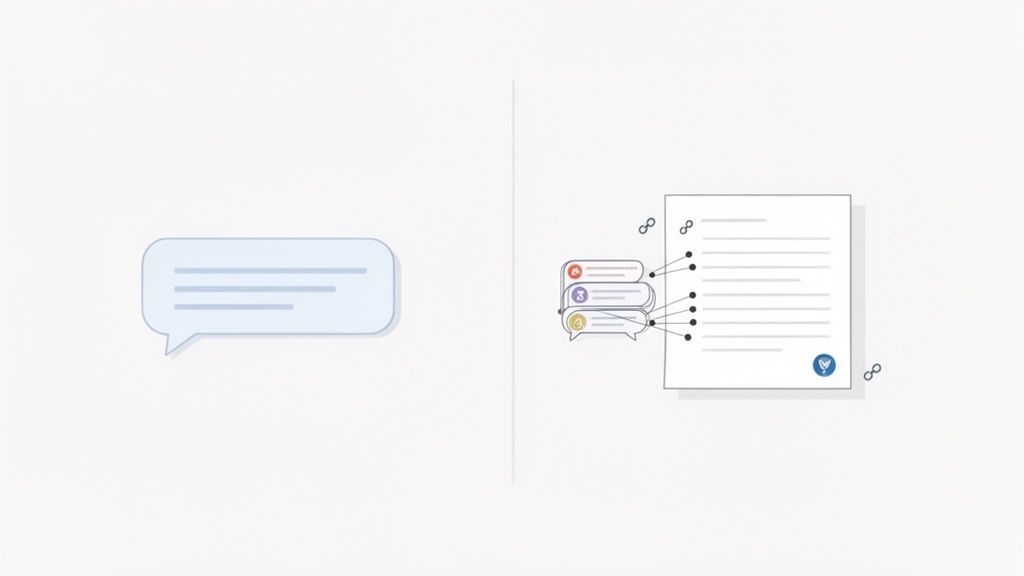
As you can see, your question gets a direct response, but it's also backed by clickable citations. These citations instantly highlight the exact passages in the source material, allowing for immediate fact-checking. This builds a ton of confidence and ensures every insight is grounded in reality.
The most important feature of a modern document AI isn't just the quality of its answer, but the transparency of its sourcing. Clickable citations transform the tool from a "black box" into a reliable research assistant.
This focus on verifiability is everything. It allows you to quickly scan a question and get an answer without ever having to second-guess the accuracy. Whether you're working with a single PDF or a massive library of project files, this conversational approach makes digging up deep knowledge easier than ever.
What You Really Gain from Conversational Document Analysis
It’s easy to get lost in the impressive tech, but what does a question answering AI actually do for you? The most obvious win is getting your time back. A lot of it. Think about the hours spent digging through dense documents, hunting for one specific piece of information. Now, you can get that same answer in minutes, just by asking a question.
But it’s not just about speed; it's about shifting how you interact with information. Instead of just passively reading, you're having a conversation. Asking questions forces you to engage with the material on a much deeper level, turning a one-way data dump into an active learning experience. You’re not just reading a document; you’re exploring it.
Work with More Confidence and Get More Done
Another massive advantage is the boost in accuracy. We’ve all been there—skimming a document and missing a crucial detail or misinterpreting a complex sentence. A question answering AI sidesteps that human error by linking every answer directly back to its source in the text.
This simple feature removes the guesswork and gives you solid ground to stand on. You never have to wonder where the AI got its information; you can see the proof for yourself. This kind of transparency has a real impact on how people work.
- For researchers and students, it means finishing literature reviews and gathering data in a fraction of the time.
- For legal and financial teams, it's about verifying facts and clauses across thousands of pages with pinpoint precision.
- For analysts, it opens up the ability to pull together insights from multiple reports, spotting trends that would have been impossible to see before.
Ultimately, it’s about empowerment. These tools let you conquer complex information on your own terms. You get to spend your brainpower on actual thinking and analysis, not on the grunt work of finding the right page.
The financial ripple effect of this change is incredible. Generative AI, which leans heavily on these Q&A systems, is expected to pump USD 15.7 trillion into the global economy by 2030. It’s no surprise that 92% of Fortune 500 firms are already on board. They see the massive productivity leaps that happen when their teams can chat with complex PDFs and pull verified insights from multiple documents at once. If you want to dig into the numbers, you can learn more about generative AI's economic impact.
So, you're ready to give question-answering AI a spin? The good news is that you don't need a degree in computer science to get started. Most of these tools are web-based, so there’s nothing to download or install. You can literally go from zero to analyzing your first document in a matter of seconds.
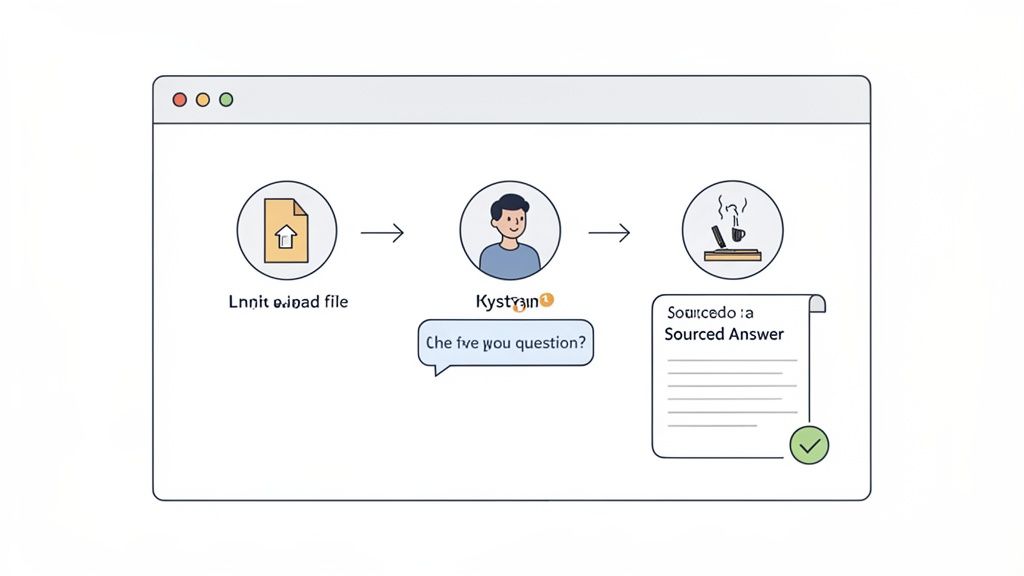
It all boils down to a straightforward process that feels a lot like sending a message to a colleague.
The Basic Three-Step Workflow
Upload Your Document(s)
First thing's first: you need to give the AI something to read. Just drag and drop your PDF file directly into the platform. Tools like PDF Summarizer get to work immediately, reading and indexing the content so it's ready for your questions.Start Asking Questions
This is where the magic happens. Head to the chat window and start asking questions, just like you would in a search engine or a chat app. The real trick to getting insightful answers is to be specific and ask open-ended questions that go beyond a simple "yes" or "no."Get Sourced, Verifiable Answers
In moments, the AI provides a direct answer. But here’s the crucial part: it also gives you clickable citations. These sources point you to the exact page and paragraph in the original document, so you can check the context and trust the information you're getting.
For those who want to get the most out of this technology, it's worth looking into the concepts behind Answer Engine Optimization. This field explores how to structure information so that AI can interpret it more effectively.
The most impactful shift is moving from passive reading to active inquiry. Instead of searching for keywords, you are now interviewing your documents to extract precise knowledge and build a deeper understanding of the material.
This simple workflow lets you jump right in and see the benefits for yourself. Since many tools offer a free trial, there's no reason not to see how it can fit into your daily tasks. This same core process is also what allows you to use AI to summarize a PDF, as the system has to deeply understand the text before it can ever hope to condense it accurately.
Common Questions About AI Document Tools
As people start digging into question answering AI, the same handful of questions always pop up. It makes sense—before you trust a new piece of technology with your research, you want to know what it can really do and where its limits are. Let's walk through some of the most common ones.
How Accurate Is This Stuff, Really?
Modern systems are surprisingly accurate, but here’s the thing: accuracy isn't even their most important feature. Transparency is. The best tools don't just spit out an answer; they show you their work by providing a direct, clickable citation that takes you to the exact spot in the original document where the answer came from.
This is what builds trust. It means you can instantly verify everything yourself. It shifts the dynamic from blind faith in an algorithm to having a reliable assistant that points you to the right information. While no AI is 100% perfect, this source-linking capability makes it an incredibly dependable partner for any kind of research.
The goal isn't just to get a correct answer but to get a verifiable one. The ability to trace information back to its origin is what separates a helpful tool from a "black box" of data.
Ultimately, a good question answering AI acts more like a guide, pointing you to the truth rather than just making claims.
Can It Handle More Than One Document at a Time?
Absolutely, and this is where these tools truly shine. The more advanced platforms are built specifically to work with entire collections of files at once. Many have a "Multi-File Chat" feature where you can drop in a whole folder of project reports, academic papers, or legal contracts and treat them as one single source.
Once they're uploaded, you can ask questions that pull insights from across the entire set. Imagine asking a dozen market analysis PDFs, "What common risks were identified across all these reports?" It's a massive time-saver for anyone doing a literature review, competitive analysis, or any task that involves finding themes across multiple sources.
Do I Need to Be a Tech Whiz to Use It?
Not in the slightest. The whole point of these tools is to make powerful technology accessible to everyone, no matter their comfort level with tech. The best question answering AI platforms are designed for simplicity. They're almost always web-based, so there’s nothing to download or install. You just open your browser and go.
If you can use a chat app, you can use this. The interface is usually dead simple: you upload your documents and just start typing questions in plain English. All the heavy lifting and complex AI processing happens in the background, making it an easy-to-use tool for any student, professional, or researcher looking for a smarter way to work.
Ready to stop skimming and start asking? Give PDF Summarizer a try and see how easy it is to have a conversation with your documents and get instant, sourced answers. You can get started for free at https://pdfsummarizer.pro.
Relevant articles

Discover how to read a PDF online using your browser or smart AI tools. Our guide shows you how to instantly open, chat with, and summarize any document.
Discover how text summarization AI turns dense documents into clear, actionable insights. Our guide explains the models, methods, and real-world applications.

Discover how a modern PDF summarization tool can transform your workflow. Learn how AI analyzes documents, its key features, and how to get accurate summaries.
Learn how to compare two documents with our complete guide. Discover manual, software, and AI-powered methods to find differences with precision and speed.
Learn how to summarize a PDF efficiently using both manual techniques and AI tools. Get actionable advice for students, researchers, and professionals.
AI to summarize pdf: Master fast, accurate summaries with practical prompts, tips, and real-world use cases to boost your productivity.