How to Take Notes on PDF Files Like a Pro
Discover the best methods to take notes on PDF documents. Learn to use smart annotation, AI summaries, and advanced workflows for better learning and research.
Staring down a dense PDF can feel overwhelming. The old routine—printing it out, breaking out the highlighters, or clumsily copying and pasting text into a separate document—is a surefire way to slow yourself down and scatter your thoughts. This guide will walk you through a much smarter way to take notes on PDF files, blending classic annotation techniques with some seriously powerful AI tools.
Why Old Note Taking Methods Are Holding You Back
If you’ve ever been surrounded by a mountain of printed PDFs, a rainbow of highlighters, and a notebook filled with scribbled thoughts, you know just how inefficient that whole process is. It's not just tedious; it creates disconnected pockets of information. Your highlights are stuck on paper, and your handwritten notes are completely detached from their original context in the document.
Going fully digital is the first real step toward a more organized and effective workflow.
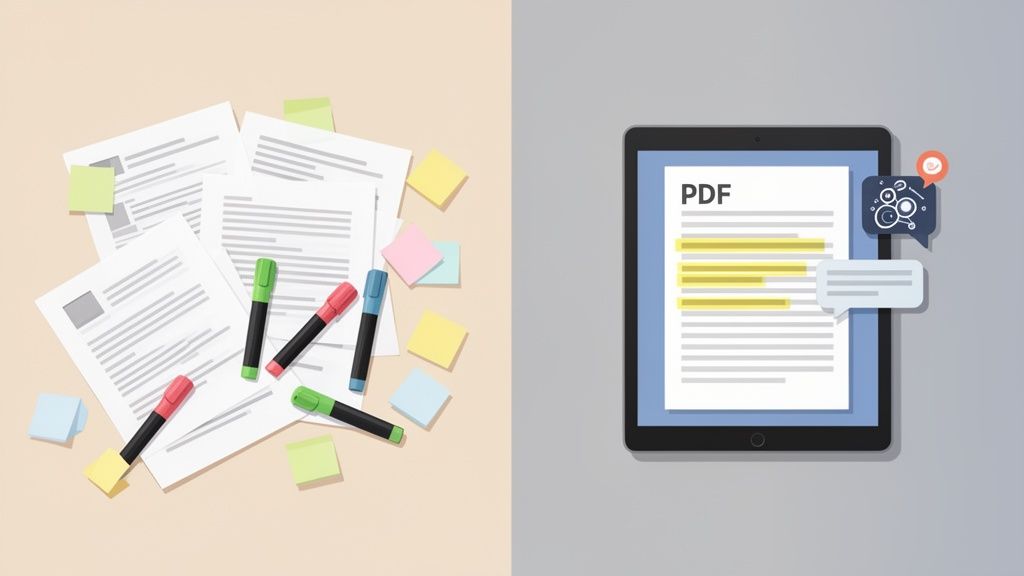
This isn't just about convenience. It’s about keeping up with the sheer volume of digital information we all deal with. Students and researchers are drowning in PDFs, often spending 12-15 hours a week just taking notes. That's a huge time sink. It's no wonder the market for document analysis—the tech behind AI summarization and extracting key points—is projected to skyrocket to USD 34.47 billion by 2035. We desperately need smarter ways to work.
The Problem with Fragmented Knowledge
When your notes live in one app and the source PDF lives in another, you break the critical link between an idea and where it came from. This makes it a real headache to do some pretty basic things:
- Verify Information Quickly: You end up manually hunting through the original PDF to find the exact sentence that sparked your note.
- Synthesize Complex Ideas: Trying to connect a point from page 5 with a concept on page 50 becomes a test of your memory, not a smooth, logical process.
- Build a Cohesive Knowledge Base: Your insights stay scattered all over the place, making it nearly impossible to create a searchable, long-term library of what you’ve learned.
The real challenge isn't just grabbing information. It's organizing it so that it's instantly useful for later—whether you're studying, doing research, or writing a paper. An effective system keeps your notes and their sources tied together.
The evolution of online stationery shows just how much our interaction with digital documents has changed. Modern tools fix this fragmentation problem by letting you anchor your notes right inside the PDF, turning it into a single, dynamic workspace.
To really see the difference, let’s compare the old way of doing things with a more modern, AI-assisted approach.
Manual vs AI-Assisted PDF Note Taking
The table below breaks down how traditional annotation stacks up against AI-powered tools, highlighting the massive gains in efficiency and understanding.
| Feature | Traditional Method (Manual Annotation) | Modern Method (AI-Assisted) |
|---|---|---|
| Summarization | Manually read, identify key points, and write summaries in a separate document or margin. Time-intensive. | Instantly generates concise summaries of entire documents or specific sections. |
| Finding Information | Relies on manual searching (Ctrl+F for keywords) or skimming through pages. Slow and often misses context. | Ask direct questions in natural language ("What is the main argument?") and get immediate, context-aware answers. |
| Tracking Sources | Requires meticulous manual citation logging. Easy to lose track of where a specific idea came from. | Provides clickable citations that link answers directly back to the exact source passage in the PDF. |
| Organization | Notes are scattered across margins, sticky notes, or separate files. Hard to consolidate and review. | Centralizes all notes, highlights, and AI-generated insights in one interactive, searchable interface. |
| Efficiency | High manual effort. Reading and note-taking are slow, linear processes that can take hours. | Drastically reduces time spent on initial reading and review, allowing more focus on analysis and critical thinking. |
As you can see, integrating AI doesn't just speed things up—it fundamentally changes how you interact with the material, turning a passive reading session into an active, insightful conversation with your documents.
Mastering the Fundamentals of PDF Annotation
Before you even think about fancy AI workflows, you need to build a solid habit with the basics. When you take notes on a PDF, you’re doing more than just highlighting stuff; you're building a roadmap for your future self. The idea is to make every single mark count, turning a static document into a dynamic study tool.
A great place to start is with a consistent color-coding system. Think of it as creating your own visual language for your research. For example, you could assign colors to different kinds of information:
- Yellow: For the main ideas and core arguments—the skeleton of the document.
- Blue: To call out key definitions, technical jargon, or specific names you need to remember.
- Green: For hard data, statistics, or evidence you’ll cite in your own work.
- Red or Pink: To flag points you question, disagree with, or need to dig into later.
This simple system turns highlighting from a passive activity into a strategic one, making it way faster to review your notes later. You can get more ideas for refining your approach in our guide on how to highlight a PDF.
Choosing the Right Tool for the Thought
Beyond just colors, you need to know when to use different annotation tools. A sticky note is perfect when you want to jot down a high-level summary of a paragraph or ask a question about a whole section. It sits neatly on the page without cluttering the text.
On the other hand, an in-line comment or a text box is your best bet for a specific critique or a detailed thought tied to a single sentence. It keeps your feedback anchored right where it belongs.
The real skill isn't just knowing what the tools do, but knowing why you're using them. A single, well-placed comment is worth more than a page full of aimless highlights. Your future self will thank you for the clarity.
Don't sleep on the drawing tools, either. Simple lines and arrows can be incredibly powerful for connecting related ideas, especially when they're scattered across a page or even different sections. Imagine drawing an arrow from a theory mentioned on page two directly to a case study on page ten that proves it. You’re literally mapping out the document's logic, which helps you synthesize the information on a much deeper level.
For anyone working on a tablet, getting your device-specific workflow down is a game-changer. If you want to really level up, check out a detailed guide on how to take notes on iPad. Many people find that the stylus and interface make it the ideal setup for marking up PDFs. This kind of deliberate practice is what turns basic annotation into a powerful method for truly engaging with your material.
Using AI to Have a Conversation with Your Documents
What if you could ask your PDF a question and get a precise answer in seconds? This isn't science fiction anymore; it’s a modern way to take notes on a PDF. It completely changes the game, shifting you from passively reading and highlighting to actively engaging with the material.
The whole process is surprisingly simple. You just upload your document to an AI tool, which instantly turns the static file into an interactive space. This unlocks what many call a 'Chat with PDF' feature. Forget scanning dozens of pages for one tiny detail—just ask.
For example, imagine you're a researcher digging through a dense academic paper. Instead of slogging through it all, you could just ask, "What was the study's conclusion on market growth?" The AI scans the whole thing and gives you a synthesized answer almost immediately.
Turning Questions into Actionable Notes
This back-and-forth conversation is a massive time-saver. Think about it: no more hunting for specific data points or re-reading entire chapters just to find a single quote. Your questions and the AI's answers become your notes, created in real time as you explore the document.
This is especially helpful when you’re grappling with complex topics. You can ask the AI to break down a difficult concept into simpler terms or to outline the core arguments in a confusing section. That kind of dynamic interaction helps you understand the material on a much deeper level, right then and there.
The real shift is from just finding information to interrogating it. Instead of just pulling out text, you're actively questioning it, which forces you to think more critically. This process naturally creates high-quality, context-rich notes.
The demand for smarter document tools is exploding. The PDF editor software market is expected to reach USD 10.01 billion by 2032, driven by professionals fed up with wasting hours on manual review. In fact, AI summarizers have been shown to cut that wasted time by a staggering 70%.
Verifying Information with Clickable Citations
Of course, with AI, trust is everything. That’s where clickable citations come in. Any good AI tool won't just give you an answer; it will also link you directly to the exact sentence or paragraph in the original PDF where it found the information. This is a non-negotiable feature for verification.
This AI-driven questioning fits perfectly with the traditional annotation workflow.
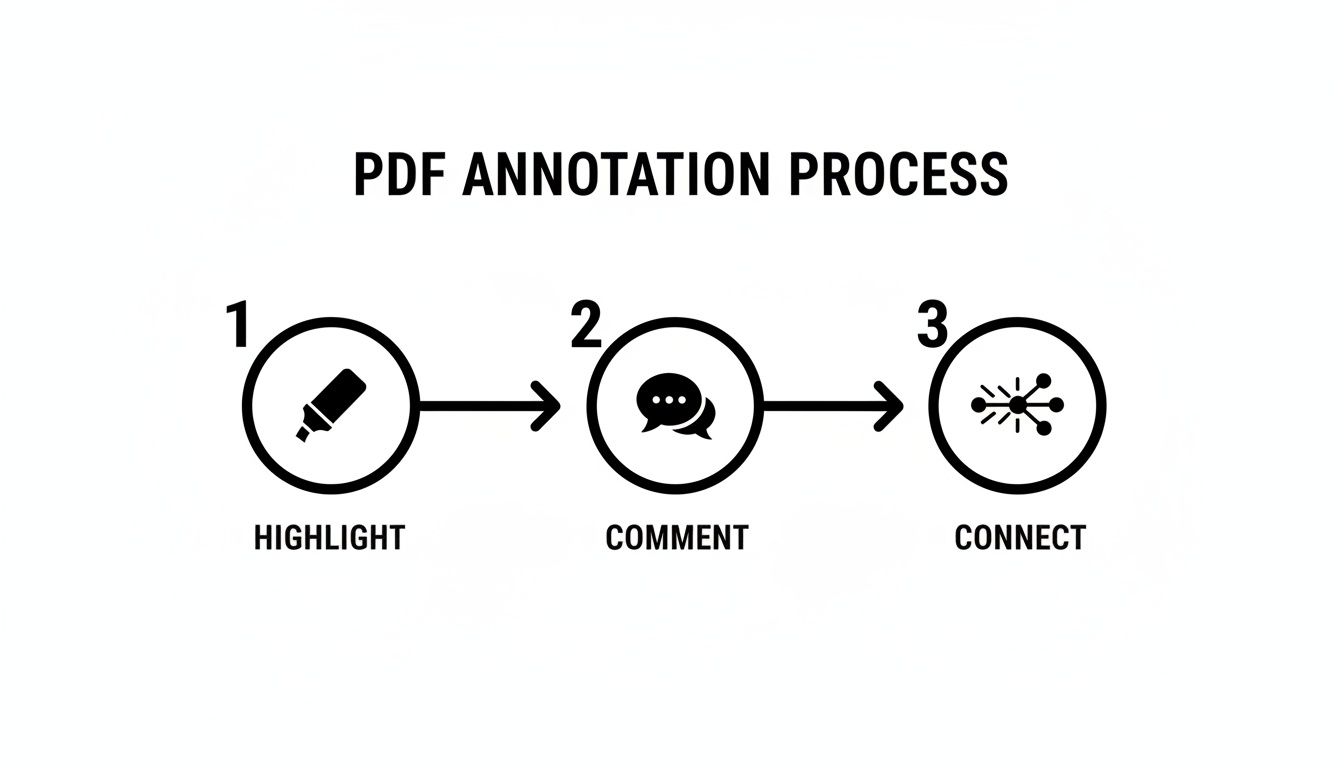
The classic flow of highlighting text, adding comments, and connecting ideas becomes so much more effective when you can instantly check AI-generated insights against the original source.
Clickable citations mean you never have to blindly trust the AI. With a single click, you jump straight to the source, read the surrounding context, and confirm everything for yourself. It’s the perfect blend of AI speed and human oversight, maintaining academic and professional integrity. To see more on how this technology functions, check out our article on question-answering AI systems.
Synthesizing Information Across Multiple PDFs
Serious research is rarely a one-and-done affair. Whether you're building a legal case, writing a thesis, or compiling market analysis, the real work begins when you have to connect the dots between dozens of different sources. Manually flipping between PDFs, copying and pasting notes, and trying to trace every citation back to its origin is a recipe for frustration and lost insights.
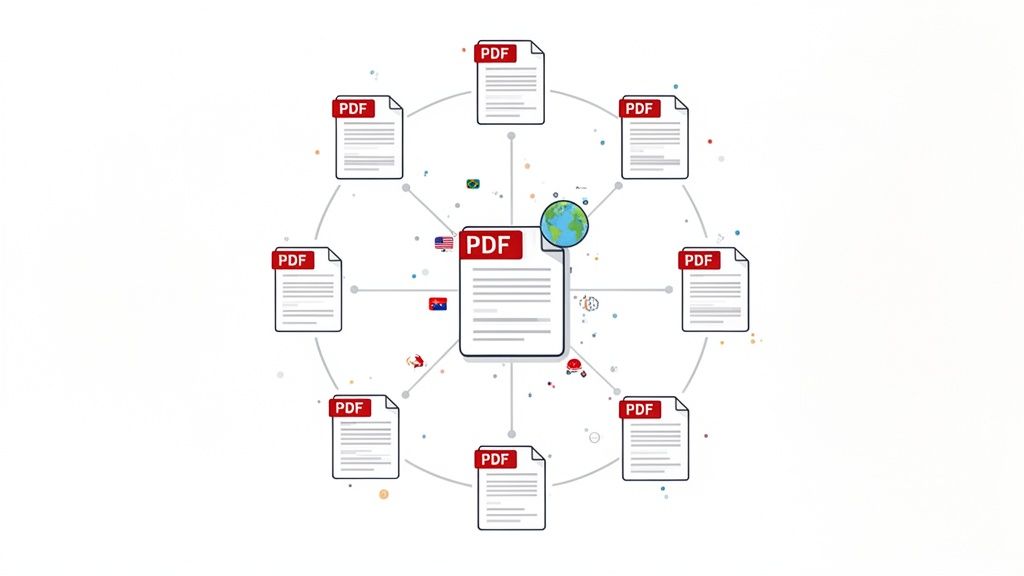
This is where the idea of taking notes on a PDF gets a major upgrade. The latest AI tools have moved beyond single-document analysis and now offer multi-file chat features that create one unified space for all your research, breaking down the digital walls between your documents.
Creating a Unified Research Hub
Let’s say you're a grad student working on a literature review about renewable energy. You've got a folder with ten dense academic papers. Instead of opening them one by one, you can upload all ten into a single chat session. In an instant, that scattered collection of files becomes an interconnected knowledge base you can question all at once.
Once your documents are loaded, you can ask big-picture questions that span the entire collection. For example:
- "Compare the findings on solar panel efficiency across all these sources."
- "Which papers here discuss the economic viability of wind power in developing nations?"
- "Summarize the main arguments against tidal energy presented in these documents."
The AI then dives into all ten papers simultaneously. It synthesizes a complete answer, pulling data from each source and—crucially—citing exactly which paper each piece of information came from. This is a game-changer, turning hours of tedious cross-referencing into a task that takes seconds.
This kind of advanced capability is driving massive growth in the global PDF software market, which was valued at USD 2.15 billion in 2024 and is projected to reach USD 5.72 billion by 2033. This boom is a direct response to the sheer volume of documents we all handle. Just look at academia, where researchers can easily spend 17 hours a week simply reading and taking notes. You can find more insights on this growth from the team at PDF Reader Pro.
The ability to chat with multiple PDFs at once is proving invaluable across many fields. It’s not just for students; lawyers, financial analysts, and market researchers are all finding powerful ways to connect information faster.
Practical Uses for Multi-File PDF Chat
| User Persona | Use Case | Example Question |
|---|---|---|
| Legal Professional | Reviewing case files, depositions, and precedents | "Across all these depositions, are there any contradictions in witness testimony regarding the events of May 15th?" |
| Financial Analyst | Analyzing quarterly reports from multiple companies | "Compare the revenue growth and net profit margins for Company A, B, and C based on their latest 10-K filings." |
| Market Researcher | Synthesizing survey data, competitor analyses, and industry reports | "What common themes emerge about consumer sentiment towards sustainable packaging in these reports?" |
| Medical Researcher | Comparing clinical trial results from various studies | "Identify the reported side effects of Drug X across all these clinical trial documents and note their frequency." |
This approach fundamentally changes the research workflow, allowing professionals to spot trends and inconsistencies that would have been nearly impossible to find manually.
Overcoming Language Barriers in Research
This multi-file capability does more than just save time; it also tears down one of the biggest walls in global research: language. So many important studies are published in languages you might not speak. In the past, this meant you either had to rely on clunky, inaccurate translation tools or simply ignore a huge chunk of valuable information.
With modern tools, you can upload a collection of papers in German, Japanese, and French, and then ask your questions in English. The AI translates and synthesizes the information on the fly, giving you a clear, consolidated answer in your preferred language.
This functionality opens up a world of international scholarship that was once out of reach. Suddenly, you can incorporate a much broader range of evidence and perspectives into your work, making your research more comprehensive and globally aware. It's like having a multilingual research assistant on call, ready to connect ideas from anywhere in the world. This is truly the next frontier of how we take notes on PDF files.
Building Your Personal Knowledge Management System
Taking great notes is only half the job. If your brilliant insights end up scattered across forgotten folders or trapped in poorly named files, they’re not doing you any good. The real magic happens when you build a personal knowledge management (PKM) system that makes your notes easy to find and genuinely useful for years to come.
This is about more than just saving a bunch of annotated PDFs. A good system turns isolated notes into a connected web of ideas that can spark your next big project. It all starts with something surprisingly simple: a consistent file-naming convention.
Create a Naming Convention That Works
We've all seen it: a desktop cluttered with files like "Final_Draft_v2.pdf" or "notes_important.pdf." That’s where knowledge goes to die. Adopting a logical naming structure is your first, most critical step toward building a library you can actually search.
A great template I’ve used for years is:
- Author-Year-Topic.pdf (e.g., Smith-2023-SolarPanelEfficiency.pdf)
This simple method instantly tells you who wrote the paper, when, and what it’s about, all without opening a single file. It makes searching your own computer incredibly fast and keeps all your source material neatly organized from the get-go.
Brilliant ideas often come from connecting older insights with new information. A well-organized system ensures those old insights are never more than a quick search away, turning past work into a valuable, active asset.
Centralize Your Insights in a Digital Hub
While it's great to take notes on PDF files directly, the synthesized knowledge you create—like those AI summaries or the key Q&A exchanges—needs a central, searchable home. This is where you start connecting the dots between different documents.
Get into the habit of exporting your most important takeaways into a dedicated note-taking app. Tools like Notion, Evernote, or Obsidian are built for exactly this. Imagine creating a single "Solar Energy" page in your Notion workspace. You can then paste in summaries, key quotes, and critical data points from a dozen different research papers you’ve processed.
This approach helps you build a powerful "second brain" where you can:
- Search everything at once: Instead of opening ten separate PDFs, you search one platform and get instant results.
- Tag and link notes: Connect a concept from one paper to a related idea from another, building a true network of knowledge.
- Add your own thoughts: Write commentary that synthesizes what you've learned from multiple sources, capturing your unique perspective.
By actively exporting and organizing your notes, you’re not just collecting information; you’re building a personal database perfectly tailored to your interests and projects. To go even deeper on structuring your digital library, check out our guide on the best practices in knowledge management. This kind of system ensures the time you spend taking notes today pays off for a long, long time.
Answering Your Top Questions About PDF Note-Taking
Even after you've got the tools and a basic workflow down, a few practical questions always seem to pop up. Let's tackle some of the most common ones I hear from people trying to get better at taking notes on PDFs.
What’s the Best Free Software to Use?
This really depends on what you’re trying to accomplish.
For simple markups—we’re talking highlighting, quick underlines, or adding a sticky note—you probably already have what you need. Modern browsers like Google Chrome and Microsoft Edge have surprisingly capable built-in PDF readers. If you prefer a standalone app, the free versions of Adobe Acrobat Reader or Preview on a Mac are solid, no-frills choices.
But if you’re doing more than just circling a few things, you'll want something more powerful. When you need to quickly pull out key arguments, create summaries, or find specific data points, a free AI-powered tool is your best bet. It lets you have a conversation with your document, which is a completely different (and faster) way to extract information.
My rule of thumb: For simple annotations, stick with built-in tools. For real analysis and understanding, you need AI chat.
Having both options in your toolkit means you’re ready for anything, from a quick proofread to a deep dive into a dense research paper.
Can I Actually Take Good Notes on My Phone?
Yes, absolutely. Working on the go isn't just possible; it's often a necessity. Taking notes on a PDF from your phone has gotten remarkably easy.
Most dedicated PDF reader apps for both iOS and Android come with a decent set of annotation tools. You can easily highlight text, add comments, and make basic marks while you’re away from your desk.
For a more robust experience without cluttering your phone with another app, I usually recommend web-based tools. They’re designed to work right in your phone's browser, so you can upload a PDF and start using advanced features like AI chat and summarization immediately. This is a game-changer for students reviewing lecture notes on the bus or professionals who need to prep for a meeting on the fly.
How Do I Combine Notes from a Bunch of Different PDFs?
This is a huge pain point for researchers, students, or anyone wrangling multiple sources. The traditional way is a nightmare: open several PDFs, find what you need in each one, and then manually copy and paste everything into a single Word or Google Doc. It’s slow, tedious, and easy to lose track of where your information came from.
A much smarter approach is to use a tool that has a "Multi-File Chat" feature. You just upload all your related PDFs—say, three different academic studies on the same topic—into one session.
Then, you can ask a question that spans the entire collection, like:
- "Compare the methodologies used in these three papers."
- "What are the common conclusions across all sources?"
The AI synthesizes the information for you, pulling answers from all the documents and, crucially, citing which PDF each piece of information came from. It essentially combines your notes for you, saving you hours of frustrating work.
Is There Any Way to Recover Notes I Forgot to Save?
We’ve all been there. That sinking feeling when you realize you just closed a file without saving hours of work. The answer, unfortunately, depends entirely on the software.
With most traditional desktop apps, if you close the window without hitting "Save," your annotations are probably gone for good. It’s a harsh lesson.
This is one of the biggest advantages of using a modern, web-based AI tool. Your interaction is a conversation, and that chat history—which contains all your AI-generated summaries, answers, and insights—is automatically saved in your browser session. You can just scroll up and copy everything into a separate document whenever you're ready.
For direct annotations on the PDF itself, it’s still a great habit to use the "Save As" function to create a new, marked-up version. That way, your original file stays clean, and your hard work is always safe.
Ready to stop just reading documents and start understanding them? With PDF Summarizer, you can chat with any PDF, get instant summaries, and synthesize information across multiple files in seconds.
Relevant articles
Master taking notes on a pdf with practical annotations, smart organization, and AI tools to boost understanding and retention.
Discover how to improve your workflow for taking notes on PDF files. Learn core techniques, AI-powered tools, and advanced strategies for better recall.
Discover how to convert any PDF to notes efficiently. This guide offers actionable workflows for students, researchers, and professionals using modern tools.
Tired of digital clutter? Learn how to organize research papers with a proven system for file naming, folder structures, and reference managers.